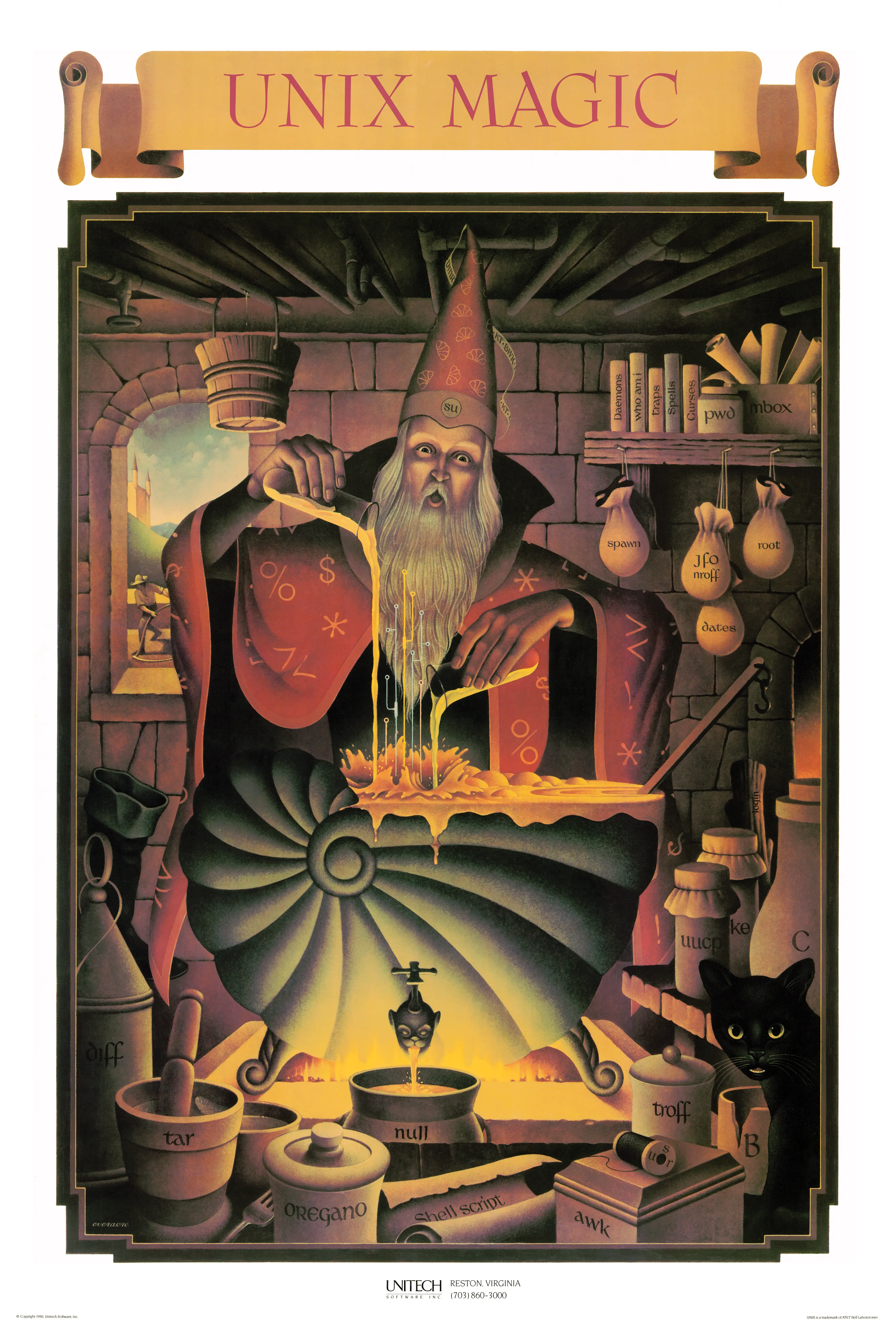
The shell gets a prominent spot on the poster because it really is the center of how you use UNIX. It’s the command-line interface where you type commands, launch programs, chain them together with pipes, and generally tell the system what to do.
What set the UNIX shell apart was that it doubled as a programming language. You could use it interactively, but you could also write scripts to automate repetitive work. Most operating systems at the time didn’t give you that.
The original was the Bourne shell (sh), written by Stephen Bourne at Bell
Labs. Countless variants followed (csh, ksh, bash, zsh) but they all
trace back to that first one.
AWK is a domain specific language designed for text processing, either run directly on files or used as part of a pipeline.
AWK was created at Bell Labs in the 1970s, and its name is derived from the surnames of its authors: Alfred Aho, Peter Weinberger and Brian Kernighan.
B is a programming language designed for recursive, non-numeric, machine-independent applications. B was derived from BCPL, and its name may possibly be a contraction of BCPL. B is an almost extinct programming language, superseded by the more modern C language.
B was developed at Bell Labs circa 1969 by Ken Thompson and Dennis Ritchie.
When two processes communicate over a pipe, the process sending data is the producer, and the process receiving data is the consumer. The OS maintains a buffer to temporarily store data if the producer sends data faster than the consumer can process it. However, if the buffer becomes full, the OS will block the producer until space is available.
Was that the intention of the artist? You decide - is the valve handle in the pipes a clever reference to UNIX back pressure, or is that a stretch?
The poster’s title is rendered in large block letters, much like the output of
the banner command. banner
takes a text string and prints it in oversized ASCII characters, originally
meant for printing headers on line printers so you could tell whose printout
was whose in a shared printer room. It was a common utility on Unix systems and
a fun one to play with at a terminal.
I have to admit, this object looks more like a boot than a sock, but I find it hard to believe that the author would leave out a reference to sockets, considering how important they are, not only in UNIX but in the history of operating systems.
For that reason, I see two possibilities:
If it is a boot, it may represent the booting process of the UNIX operating system, a fundamental part of bringing the system to life.
Alternatively, if it is a sock (granted, a thick and oversized one! π), it is likely a playful reference to UNIX network sockets. Network sockets were an abstraction pioneered by UNIX in BSD UNIX (4.2BSD, 1983). Sockets provided a unified interface for interprocess communication (IPC), enabling processes to communicate both locally (on the same machine) via UNIX domain sockets, and over a network using TCP/IP. The socket API from BSD was later adopted by virtually every other operating system.
For more on the history of BSD sockets, see Berkeley Sockets β
Wikipedia, or read the
official Linux man page for
socket().
cat derives its name from its function of
(con)catenating files together.
The original version of cat was part of version 1 of Unix, and written by Ken Thompson and Dennis Ritchie.
The curses programming
library provides a layer of abstraction over sending graphical and positioning
data directly to allow for graphical elements and cursor positioning in Unix terminals.
The name is a pun on the term “cursor optimization”.
The first curses library was written by Ken Arnold and originally released with BSD UNIX.
Daemons are programs that run in the background and are often started at system boot time. They respond to network requests, hardware activity, or other programs by performing some task. Daemons such as cron may also perform defined tasks at scheduled times.
The term was coined by the programmers at MIT’s Project MAC. It is inspired by Maxwell’s demon and greek mythology, acting as a metaphor for a supernatural being working in the background.
date is a command to display and set a UNIX system date.
Unix time is currently defined as the number of non-leap seconds which have passed since 00:00:00 UTC on Thursday, 1 January 1970, which is referred to as the Unix epoch.
The earliest versions of Unix time had a 32-bit integer incrementing at a rate of 60 Hz, which was the rate of the system clock on the hardware of the early Unix systems. Timestamps stored this way could only represent a range of a little over two and a quarter years.
The current epoch of 1 January 1970 00:00:00 UTC was selected arbitrarily by Unix engineers because it was considered a convenient date to work with.
diff is a data comparison tool that computes
and displays the differences in the contents of files.
diff is line oriented and is often used to determine changes between two versions
of the same file.
For example, diff can be used to find which lines have changed in a source file,
allowing for only transmission of the changes, rather than the whole file.
diff as developed in the early 1970s at Bell Labs.
The tree-like shape the wizard is manipulating is likely a reference to the
UNIX filesystem hierarchy. UNIX organizes files and directories as a tree
rooted at /, branching into subdirectories like /usr, /bin, /etc, and
so on. You navigate it with commands like cd, ls, and pwd.
The branching form could also represent process trees. Every process in UNIX
has a parent, forming a tree rooted at init (PID 1).
In multitasking operating systems, processes need a way to create new processes. Forking a process is typically the only way of doing so in Unix-like systems.
One of the earliest references to a fork concept appeared in A Multiprocessor System Design by Melvin Conway, published in 1962.
nroff, short for “new roff”
is a text-formatting program produces output suitable for simple fixed-width
printers and terminal windows.
It is an integral part of the Unix help system, being used to format man pages for display.
The letters Jfo stand for Joseph Frank Ossanna
who created the original version of nroff for Version 2 Unix.
These three sets of initials refer to key figures in Unix history:
dmr - Dennis M. Ritchie, co-creator of Unix and creator of the C programming language.
kt - Ken Thompson, co-creator of Unix alongside Ritchie. The poster shows “kt”, though his actual Bell Labs login was “ken”, which is how he’s usually referenced in early Unix source code and documentation.
bwk - Brian W. Kernighan, co-author of “The C Programming Language” and
“The UNIX Programming Environment”, and contributor to many Unix tools
including awk (the ‘k’ in awk).
login is the gateway into the system. It authenticates the user, initializes
the environment by changing to the userβs home directory, and spawns a process
running as the user (with their uid and gid), using their shell of choice.
Additionally, the standard input and output need to be attached to a terminal:
this could be a pseudo-terminal (if you are in a graphical interface or
using ssh), or a physical terminal (as was common at the time).
Make is a command line interface
that reads in a configuration Makefile that is often used in code executable
compilation and automation.
Before Make, building on Unix mostly consisted of shell scripts written for each program’s codebase.
Make’s dependency ordering and out-of-date checking makes the build process more robust and more efficient.
Stuart Feldman was the original author of Make, completing an early version in April 1976 at Bell Labs.
The man(1) command (short for manual) is used to display online reference manuals (man pages) for commands, system calls, configuration files, and other aspects of the system. man provides detailed documentation on how to use a command, including its options, usage examples, related files, and other pertinent details.
There’s some ambiguity as to what the interpretation of the man in the window could represent. The man is holding a scythe, which could represent reaping a process. Under Unix like systems, process reaping is when a parent process reads the exit status of a spawned child process, allowing the child process to be removed from the process table.
Others have suggested that the man could represent a hacker, a term used to mean a skilled or clever programmer.
mbox is a reference to the mail format from the early days of UNIX. In the
mbox format, all email messages for a user are stored in a single file, with
new messages appended to the end. User mailboxes lived in
/usr/mail/<username>. It’s a good example of the “everything is a file”
principle. You could read your mail with standard text tools, and system
notifications were just more messages appended to the same file.
A memory leak occurs when a computer program improperly manages memory allocation, failing to release memory thatβs no longer needed. Over time, these un-freed allocations accumulate, reducing the amount of available memory for other processes and potentially leading to slowdowns or crashes.
The Null device is a device file that discards all data written to it but reports that the write operation succeeded. This device is called /dev/null on Unix and Unix-like systems. The null device is typically used for disposing of unwanted output streams of a process, or as a convenient empty file for input streams.
From Sarah Groves Hobart:
The oregano is reputedly referring to an incident in which one of the original folks involved with BSD was hassled for coming across the Canadian/U.S. border with a bag of what was assumed to be an illegal substance, and turned out to be oregano.
The overflowing liquid from the shell looks like a visual nod to buffer overflows. A buffer overflow happens when a program writes past the end of a fixed-size memory buffer, spilling data into adjacent memory. This can overwrite return addresses or other critical data, leading to crashes or exploitable security holes.
Buffer overflows have been a persistent problem in C programs on UNIX systems,
from the 1988 Morris worm (which exploited one in fingerd) to modern CVEs.
C’s lack of bounds checking on arrays makes this easy to get wrong, and UNIX
systems have been a primary target because of how widely deployed they are.
For more, see Buffer overflow β Wikipedia.
Pipes let you
connect the output of one command to the input of another using the |
character. Instead of saving intermediate results to files, you just chain
commands together: ls | grep txt | wc -l. Each program reads from the
previous one’s output and writes to the next one’s input.
Doug McIlroy pushed for pipes at Bell Labs, and they became one of the ideas that defined the UNIX philosophy: write small programs that do one thing, then combine them.
pwd prints the full path
of your current working directory. It stands for “print working directory” and
is one of the most basic navigation commands in UNIX. You use it to figure out
where you are in the filesystem. It’s been part of UNIX since the early days
and is a shell built-in on most modern systems.
The root user is the name often given to the administrator or superuser account on UNIX systems. In Unix-like systems, root is the conventional name of the user who has all rights or permissions to all files and programs in all modes (e.g. single- or multi-user). The root user can do many things an ordinary user cannot, such as changing the ownership of files and binding to network ports numbered below 1024.
A shell script is a text file containing a sequence of shell commands that run as a program. Instead of typing commands one at a time, you write them into a file and execute it.
Shell scripts are what made UNIX administration practical. System startup, backups, log rotation, batch processing - all of it was (and still is) driven by shell scripts. Because the shell already knows how to run programs, redirect I/O, and handle pipes, a script gets all of that for free. Add variables, loops, and conditionals, and you have a real programming language that’s tightly integrated with the operating system.
The wizardβs cloak is decorated with symbols that represent some of the most important special characters used in the UNIX shell. These symbols are the “runes” of UNIX power, allowing users to combine commands, redirect input and output, and control processes with precision. Mastery of these symbols is part of what transforms a regular user into a “UNIX wizard.”
% β Job ControlUsed to refer to background jobs in the shell.
jobs β List background jobs.fg %1 β Bring job 1 to the foreground.bg %2 β Resume job 2 in the background.$ β Variable Expansion & Shell PromptRepresents variables and parameter substitution.
$HOME β Expands to the value of the HOME environment variable.$? β Shows the exit status of the last command.Also often appears as the shell prompt for a regular user.
> β Output RedirectionRedirects standard output to a file.
ls > files.txt β Writes the output of ls into files.txt (overwriting it).< β Input RedirectionRedirects standard input from a file.
sort < input.txt β Reads input from input.txt instead of the keyboard.* β Wildcard (Glob)Matches any number of characters in filenames.
ls *.txt β Lists all files ending in .txt.rm * β Deletes all files in the current directory (Dangerous!).! β History ExpansionExpands to previously executed commands.
!! β Repeats the last command.!ls β Repeats the last command starting with ls.!$ β Expands to the last argument of the previous command.[ ] β Test / Conditional ExpressionsUsed in shell conditionals and if statements.
[ -f file.txt ] β Tests if file.txt is a regular file.if [ -f file.txt ]; then
echo "File exists!"
fi
The skull-like spigot connected to the shell most likely represents
/dev/null, the special UNIX device that discards all data written to it.
Redirecting output to /dev/null sends it into a void. Nothing comes back.
The skull is a fitting symbol for where data goes to die. See also the
/dev/null entry.
It could also be a nod to UNIX daemons, background processes that run without a terminal. The gargoyle-like appearance of the spigot fits the daemon imagery.
Spawning means creating a new child process. In UNIX, this is traditionally
done with fork and exec: fork creates a copy of the current process,
then the child calls exec to replace itself with a different program. The
parent typically calls wait to wait for the child to finish.
POSIX also defines posix_spawn, which combines the two steps into one call
and can be more efficient since it avoids copying the parent’s entire address
space.
spell is the standard English
language spell checker for Unix and other Unix-like operating systems.
The original version was written by Stephen C. Johnson for Version 6 UNIX while at Bell Labs in 1976.
This references /usr/spool, a directory used for temporary storage of data
waiting to be processed. Print jobs, outgoing mail, and UUCP transfers all
queued here. The name comes from “Simultaneous Peripheral Operations On-Line”
/var/spool.Thanks to Andrew Tanenbaum for pointing out that threads were not available in early UNIX. He also shared Rob Pike’s UNIX quiz.
The su command (short for βsubstitute userβ or βswitch userβ) is used to start a shell under a different user account. Typically, one of the most common uses of su is switching to the superuser (root) account to gain administrative privileges.
Tar is a software tool for collecting multiple files into a single archive file, often called a tarball. The name is derived from “tape archive”, as it was originally developed to write data to sequential I/O devices with no file system of their own, such as devices that use magnetic tape.
The command-line utility was first introduced in the Version 7 Unix in January 1979, replacing the tp program (which in turn replaced tap).
The T-shaped pipe junctions in the poster may reference the
tee command. tee reads
from standard input and writes to both standard output and one or more files at
the same time, like a T-junction splitting a flow of water.
This is handy for debugging pipelines (you can tap into the middle of a chain
to see what’s flowing through) or for logging (save a copy of the data while
still passing it along): make 2>&1 | tee build.log.
Dennis Ritchie created C at Bell Labs in the early 1970s, and Unix was rewritten in it shortly after. Before that, Unix was written in PDP assembly, which meant it only ran on PDP machines. Rewriting it in C made it possible to port Unix to other hardware. You just needed a C compiler for the target platform. That portability is a big reason Unix spread through universities and eventually into commercial use.
Traps, or signals, are sent from the kernel to a process, notifying the process of an event. Common signals are interrupt, terminate or kill, with some signal handling useful for inter-process communication and coordination.
Troff is the major component of a document processing system developed by Bell Labs for the Unix operating system.
Troff stands for “typesetter roff”, developed as a descendant to
roff, where roff was
a Unix version of one of the earliest text formatting programs called RUNOFF.
A typical distribution of troff includes macros for many document styles, including ones for the Unix man pages.
Troff was developed by Bell Labs in the 1970s, where Joseph Ossanna created troff by modifying nroff to support multiple fonts and proportional spacing.
uucp (Unix-to-Unix Copy) was a suite
of programs for copying files between Unix systems over phone lines using
modems. Written by Mike Lesk at Bell Labs in 1978, it was one of the earliest
ways Unix machines could talk to each other.
UUCP was the backbone of Usenet and early email between sites. Machines would dial each other on a schedule, exchange queued files and messages, then hang up. It wasn’t fast, but it connected Unix systems years before the internet was widely available.
The wall command is a command-line utility that displays the contents of the specified file or otherwise its standard input on the terminals of all currently logged-in users. It is typically used by root to send out shutting down message to all users just before poweroff.
Users on UNIX systems may want to
switch to other accounts, allowing for switching roles, escalation or deescalation of
privileges or might be logging into multiple machines across networks.
The whoami is a command to tell the invoker
what user they are logged in as.
The earliest versions were created in 2.9 BSD.
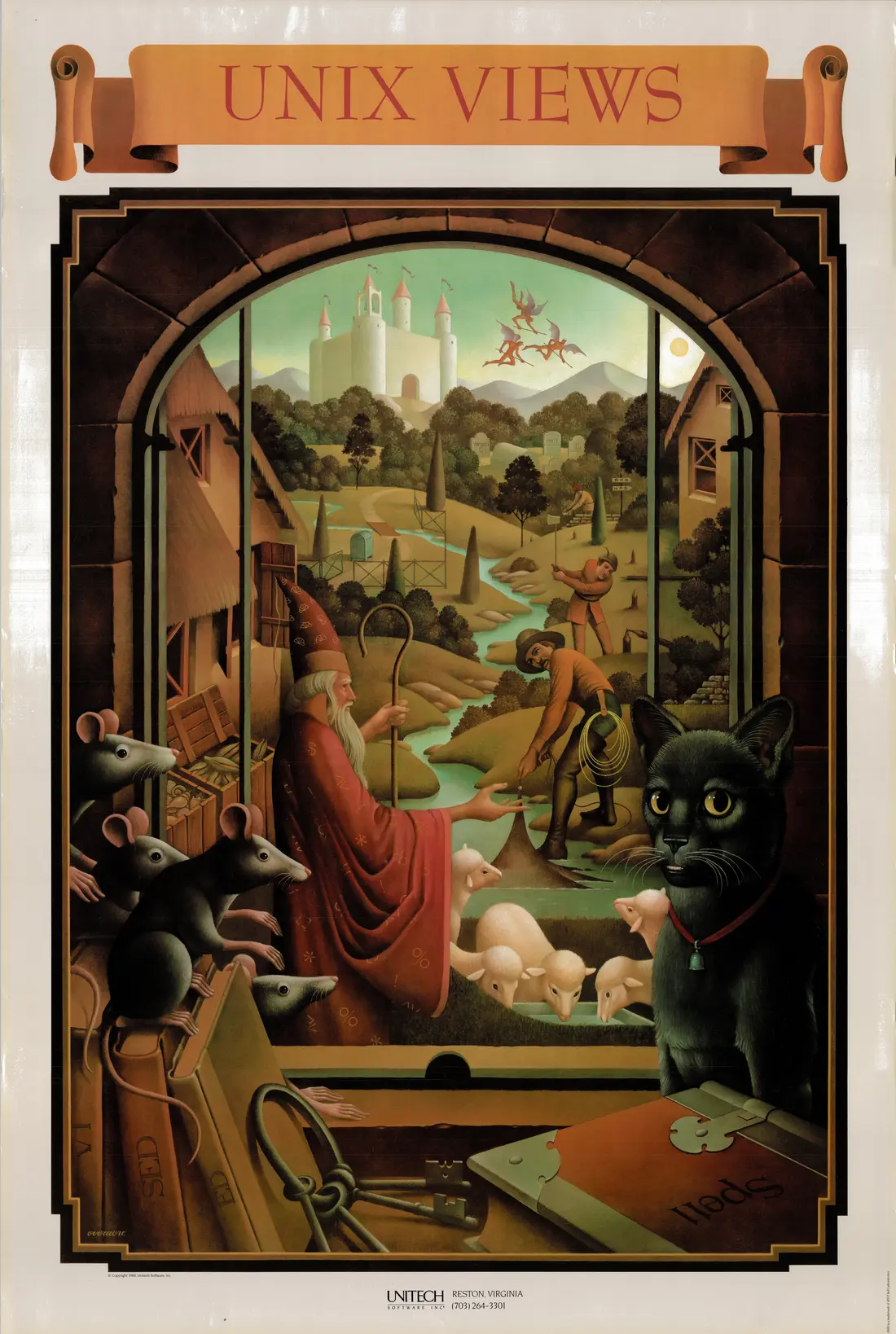
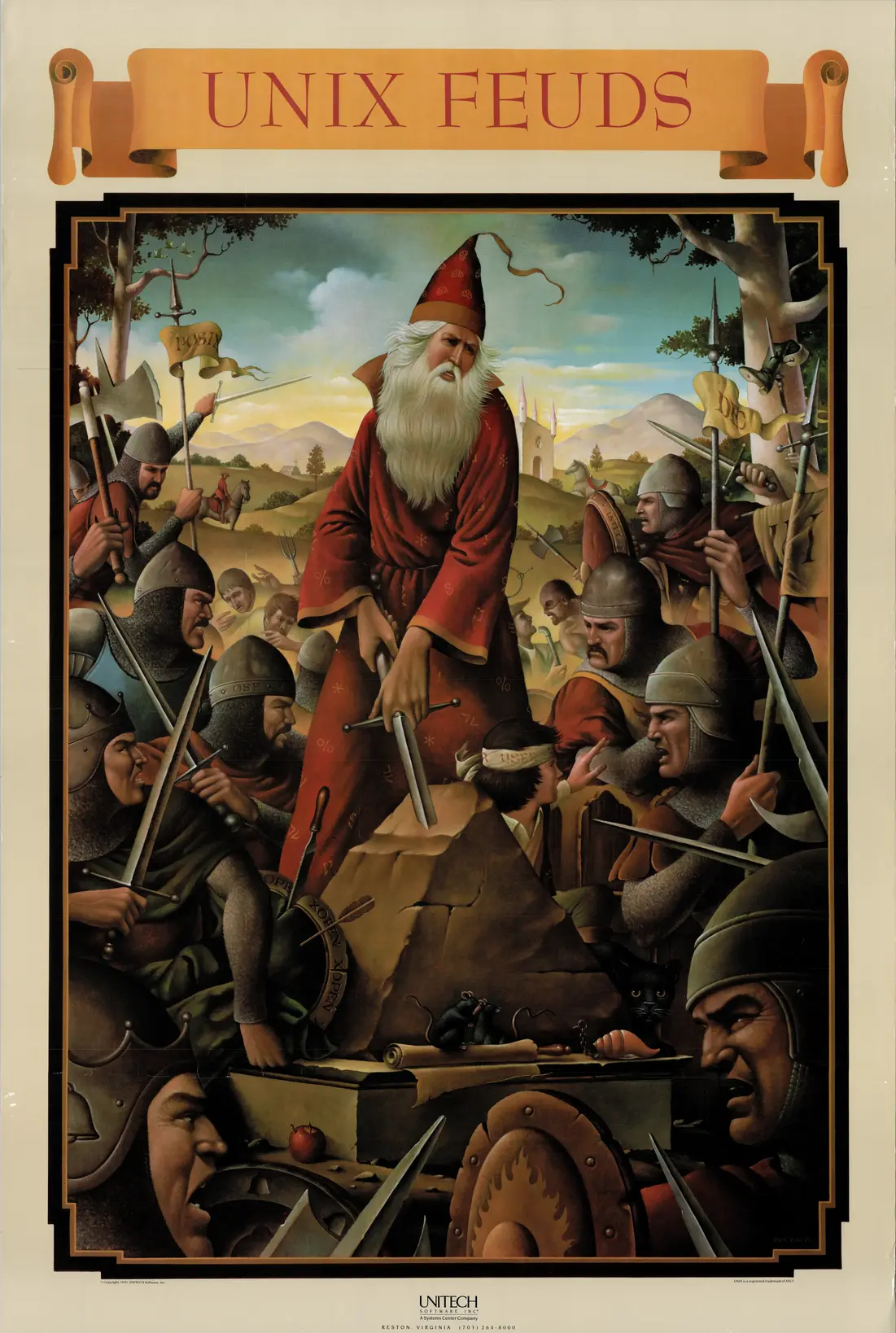
This is the UNIX Magic Poster, originally created by Gary Overacre in the mid-1980s and published by UniTech Software. It was later seen on display at a USENIX Conference. Head over to the repo if you'd like to contribute!
UNIX has been a big part of my career from the start. My first exposure was during college, when I wrote most of my first-year programming assignments on terminals connected to an HP-UX main server. Coming from DOS and Windows, the simplicity and power of UNIX hit me right away.
That experience changed how I thought about computers. From that point on, I never looked back. UNIX has been part of my computing life ever since. This project is my way of celebrating that.
$ ./enjoy
-drio
The shell gets a prominent spot on the poster because it really is the center of how you use UNIX. It’s the command-line interface where you type commands, launch programs, chain them together with pipes, and generally tell the system what to do.
What set the UNIX shell apart was that it doubled as a programming language. You could use it interactively, but you could also write scripts to automate repetitive work. Most operating systems at the time didn’t give you that.
The original was the Bourne shell (sh), written by Stephen Bourne at Bell
Labs. Countless variants followed (csh, ksh, bash, zsh) but they all
trace back to that first one.
The man(1) command (short for manual) is used to display online reference manuals (man pages) for commands, system calls, configuration files, and other aspects of the system. man provides detailed documentation on how to use a command, including its options, usage examples, related files, and other pertinent details.
There’s some ambiguity as to what the interpretation of the man in the window could represent. The man is holding a scythe, which could represent reaping a process. Under Unix like systems, process reaping is when a parent process reads the exit status of a spawned child process, allowing the child process to be removed from the process table.
Others have suggested that the man could represent a hacker, a term used to mean a skilled or clever programmer.
Pipes let you
connect the output of one command to the input of another using the |
character. Instead of saving intermediate results to files, you just chain
commands together: ls | grep txt | wc -l. Each program reads from the
previous one’s output and writes to the next one’s input.
Doug McIlroy pushed for pipes at Bell Labs, and they became one of the ideas that defined the UNIX philosophy: write small programs that do one thing, then combine them.
A memory leak occurs when a computer program improperly manages memory allocation, failing to release memory thatβs no longer needed. Over time, these un-freed allocations accumulate, reducing the amount of available memory for other processes and potentially leading to slowdowns or crashes.
These three sets of initials refer to key figures in Unix history:
dmr - Dennis M. Ritchie, co-creator of Unix and creator of the C programming language.
kt - Ken Thompson, co-creator of Unix alongside Ritchie. The poster shows “kt”, though his actual Bell Labs login was “ken”, which is how he’s usually referenced in early Unix source code and documentation.
bwk - Brian W. Kernighan, co-author of “The C Programming Language” and
“The UNIX Programming Environment”, and contributor to many Unix tools
including awk (the ‘k’ in awk).
Dennis Ritchie created C at Bell Labs in the early 1970s, and Unix was rewritten in it shortly after. Before that, Unix was written in PDP assembly, which meant it only ran on PDP machines. Rewriting it in C made it possible to port Unix to other hardware. You just needed a C compiler for the target platform. That portability is a big reason Unix spread through universities and eventually into commercial use.
When two processes communicate over a pipe, the process sending data is the producer, and the process receiving data is the consumer. The OS maintains a buffer to temporarily store data if the producer sends data faster than the consumer can process it. However, if the buffer becomes full, the OS will block the producer until space is available.
Was that the intention of the artist? You decide - is the valve handle in the pipes a clever reference to UNIX back pressure, or is that a stretch?
Daemons are programs that run in the background and are often started at system boot time. They respond to network requests, hardware activity, or other programs by performing some task. Daemons such as cron may also perform defined tasks at scheduled times.
The term was coined by the programmers at MIT’s Project MAC. It is inspired by Maxwell’s demon and greek mythology, acting as a metaphor for a supernatural being working in the background.
The su command (short for βsubstitute userβ or βswitch userβ) is used to start a shell under a different user account. Typically, one of the most common uses of su is switching to the superuser (root) account to gain administrative privileges.
The Null device is a device file that discards all data written to it but reports that the write operation succeeded. This device is called /dev/null on Unix and Unix-like systems. The null device is typically used for disposing of unwanted output streams of a process, or as a convenient empty file for input streams.
From Sarah Groves Hobart:
The oregano is reputedly referring to an incident in which one of the original folks involved with BSD was hassled for coming across the Canadian/U.S. border with a bag of what was assumed to be an illegal substance, and turned out to be oregano.
Tar is a software tool for collecting multiple files into a single archive file, often called a tarball. The name is derived from “tape archive”, as it was originally developed to write data to sequential I/O devices with no file system of their own, such as devices that use magnetic tape.
The command-line utility was first introduced in the Version 7 Unix in January 1979, replacing the tp program (which in turn replaced tap).
In multitasking operating systems, processes need a way to create new processes. Forking a process is typically the only way of doing so in Unix-like systems.
One of the earliest references to a fork concept appeared in A Multiprocessor System Design by Melvin Conway, published in 1962.
A shell script is a text file containing a sequence of shell commands that run as a program. Instead of typing commands one at a time, you write them into a file and execute it.
Shell scripts are what made UNIX administration practical. System startup, backups, log rotation, batch processing - all of it was (and still is) driven by shell scripts. Because the shell already knows how to run programs, redirect I/O, and handle pipes, a script gets all of that for free. Add variables, loops, and conditionals, and you have a real programming language that’s tightly integrated with the operating system.
AWK is a domain specific language designed for text processing, either run directly on files or used as part of a pipeline.
AWK was created at Bell Labs in the 1970s, and its name is derived from the surnames of its authors: Alfred Aho, Peter Weinberger and Brian Kernighan.
This references /usr/spool, a directory used for temporary storage of data
waiting to be processed. Print jobs, outgoing mail, and UUCP transfers all
queued here. The name comes from “Simultaneous Peripheral Operations On-Line”
/var/spool.Thanks to Andrew Tanenbaum for pointing out that threads were not available in early UNIX. He also shared Rob Pike’s UNIX quiz.
Troff is the major component of a document processing system developed by Bell Labs for the Unix operating system.
Troff stands for “typesetter roff”, developed as a descendant to
roff, where roff was
a Unix version of one of the earliest text formatting programs called RUNOFF.
A typical distribution of troff includes macros for many document styles, including ones for the Unix man pages.
Troff was developed by Bell Labs in the 1970s, where Joseph Ossanna created troff by modifying nroff to support multiple fonts and proportional spacing.
B is a programming language designed for recursive, non-numeric, machine-independent applications. B was derived from BCPL, and its name may possibly be a contraction of BCPL. B is an almost extinct programming language, superseded by the more modern C language.
B was developed at Bell Labs circa 1969 by Ken Thompson and Dennis Ritchie.
cat derives its name from its function of
(con)catenating files together.
The original version of cat was part of version 1 of Unix, and written by Ken Thompson and Dennis Ritchie.
uucp (Unix-to-Unix Copy) was a suite
of programs for copying files between Unix systems over phone lines using
modems. Written by Mike Lesk at Bell Labs in 1978, it was one of the earliest
ways Unix machines could talk to each other.
UUCP was the backbone of Usenet and early email between sites. Machines would dial each other on a schedule, exchange queued files and messages, then hang up. It wasn’t fast, but it connected Unix systems years before the internet was widely available.
I have to admit, this object looks more like a boot than a sock, but I find it hard to believe that the author would leave out a reference to sockets, considering how important they are, not only in UNIX but in the history of operating systems.
For that reason, I see two possibilities:
If it is a boot, it may represent the booting process of the UNIX operating system, a fundamental part of bringing the system to life.
Alternatively, if it is a sock (granted, a thick and oversized one! π), it is likely a playful reference to UNIX network sockets. Network sockets were an abstraction pioneered by UNIX in BSD UNIX (4.2BSD, 1983). Sockets provided a unified interface for interprocess communication (IPC), enabling processes to communicate both locally (on the same machine) via UNIX domain sockets, and over a network using TCP/IP. The socket API from BSD was later adopted by virtually every other operating system.
For more on the history of BSD sockets, see Berkeley Sockets β
Wikipedia, or read the
official Linux man page for
socket().
Make is a command line interface
that reads in a configuration Makefile that is often used in code executable
compilation and automation.
Before Make, building on Unix mostly consisted of shell scripts written for each program’s codebase.
Make’s dependency ordering and out-of-date checking makes the build process more robust and more efficient.
Stuart Feldman was the original author of Make, completing an early version in April 1976 at Bell Labs.
Spawning means creating a new child process. In UNIX, this is traditionally
done with fork and exec: fork creates a copy of the current process,
then the child calls exec to replace itself with a different program. The
parent typically calls wait to wait for the child to finish.
POSIX also defines posix_spawn, which combines the two steps into one call
and can be more efficient since it avoids copying the parent’s entire address
space.
nroff, short for “new roff”
is a text-formatting program produces output suitable for simple fixed-width
printers and terminal windows.
It is an integral part of the Unix help system, being used to format man pages for display.
The letters Jfo stand for Joseph Frank Ossanna
who created the original version of nroff for Version 2 Unix.
The root user is the name often given to the administrator or superuser account on UNIX systems. In Unix-like systems, root is the conventional name of the user who has all rights or permissions to all files and programs in all modes (e.g. single- or multi-user). The root user can do many things an ordinary user cannot, such as changing the ownership of files and binding to network ports numbered below 1024.
date is a command to display and set a UNIX system date.
Unix time is currently defined as the number of non-leap seconds which have passed since 00:00:00 UTC on Thursday, 1 January 1970, which is referred to as the Unix epoch.
The earliest versions of Unix time had a 32-bit integer incrementing at a rate of 60 Hz, which was the rate of the system clock on the hardware of the early Unix systems. Timestamps stored this way could only represent a range of a little over two and a quarter years.
The current epoch of 1 January 1970 00:00:00 UTC was selected arbitrarily by Unix engineers because it was considered a convenient date to work with.
Users on UNIX systems may want to
switch to other accounts, allowing for switching roles, escalation or deescalation of
privileges or might be logging into multiple machines across networks.
The whoami is a command to tell the invoker
what user they are logged in as.
The earliest versions were created in 2.9 BSD.
pwd prints the full path
of your current working directory. It stands for “print working directory” and
is one of the most basic navigation commands in UNIX. You use it to figure out
where you are in the filesystem. It’s been part of UNIX since the early days
and is a shell built-in on most modern systems.
mbox is a reference to the mail format from the early days of UNIX. In the
mbox format, all email messages for a user are stored in a single file, with
new messages appended to the end. User mailboxes lived in
/usr/mail/<username>. It’s a good example of the “everything is a file”
principle. You could read your mail with standard text tools, and system
notifications were just more messages appended to the same file.
login is the gateway into the system. It authenticates the user, initializes
the environment by changing to the userβs home directory, and spawns a process
running as the user (with their uid and gid), using their shell of choice.
Additionally, the standard input and output need to be attached to a terminal:
this could be a pseudo-terminal (if you are in a graphical interface or
using ssh), or a physical terminal (as was common at the time).
spell is the standard English
language spell checker for Unix and other Unix-like operating systems.
The original version was written by Stephen C. Johnson for Version 6 UNIX while at Bell Labs in 1976.
The curses programming
library provides a layer of abstraction over sending graphical and positioning
data directly to allow for graphical elements and cursor positioning in Unix terminals.
The name is a pun on the term “cursor optimization”.
The first curses library was written by Ken Arnold and originally released with BSD UNIX.
diff is a data comparison tool that computes
and displays the differences in the contents of files.
diff is line oriented and is often used to determine changes between two versions
of the same file.
For example, diff can be used to find which lines have changed in a source file,
allowing for only transmission of the changes, rather than the whole file.
diff as developed in the early 1970s at Bell Labs.
Traps, or signals, are sent from the kernel to a process, notifying the process of an event. Common signals are interrupt, terminate or kill, with some signal handling useful for inter-process communication and coordination.
The wizardβs cloak is decorated with symbols that represent some of the most important special characters used in the UNIX shell. These symbols are the “runes” of UNIX power, allowing users to combine commands, redirect input and output, and control processes with precision. Mastery of these symbols is part of what transforms a regular user into a “UNIX wizard.”
% β Job ControlUsed to refer to background jobs in the shell.
jobs β List background jobs.fg %1 β Bring job 1 to the foreground.bg %2 β Resume job 2 in the background.$ β Variable Expansion & Shell PromptRepresents variables and parameter substitution.
$HOME β Expands to the value of the HOME environment variable.$? β Shows the exit status of the last command.Also often appears as the shell prompt for a regular user.
> β Output RedirectionRedirects standard output to a file.
ls > files.txt β Writes the output of ls into files.txt (overwriting it).< β Input RedirectionRedirects standard input from a file.
sort < input.txt β Reads input from input.txt instead of the keyboard.* β Wildcard (Glob)Matches any number of characters in filenames.
ls *.txt β Lists all files ending in .txt.rm * β Deletes all files in the current directory (Dangerous!).! β History ExpansionExpands to previously executed commands.
!! β Repeats the last command.!ls β Repeats the last command starting with ls.!$ β Expands to the last argument of the previous command.[ ] β Test / Conditional ExpressionsUsed in shell conditionals and if statements.
[ -f file.txt ] β Tests if file.txt is a regular file.if [ -f file.txt ]; then
echo "File exists!"
fi
The overflowing liquid from the shell looks like a visual nod to buffer overflows. A buffer overflow happens when a program writes past the end of a fixed-size memory buffer, spilling data into adjacent memory. This can overwrite return addresses or other critical data, leading to crashes or exploitable security holes.
Buffer overflows have been a persistent problem in C programs on UNIX systems,
from the 1988 Morris worm (which exploited one in fingerd) to modern CVEs.
C’s lack of bounds checking on arrays makes this easy to get wrong, and UNIX
systems have been a primary target because of how widely deployed they are.
For more, see Buffer overflow β Wikipedia.
The T-shaped pipe junctions in the poster may reference the
tee command. tee reads
from standard input and writes to both standard output and one or more files at
the same time, like a T-junction splitting a flow of water.
This is handy for debugging pipelines (you can tap into the middle of a chain
to see what’s flowing through) or for logging (save a copy of the data while
still passing it along): make 2>&1 | tee build.log.
The tree-like shape the wizard is manipulating is likely a reference to the
UNIX filesystem hierarchy. UNIX organizes files and directories as a tree
rooted at /, branching into subdirectories like /usr, /bin, /etc, and
so on. You navigate it with commands like cd, ls, and pwd.
The branching form could also represent process trees. Every process in UNIX
has a parent, forming a tree rooted at init (PID 1).
The skull-like spigot connected to the shell most likely represents
/dev/null, the special UNIX device that discards all data written to it.
Redirecting output to /dev/null sends it into a void. Nothing comes back.
The skull is a fitting symbol for where data goes to die. See also the
/dev/null entry.
It could also be a nod to UNIX daemons, background processes that run without a terminal. The gargoyle-like appearance of the spigot fits the daemon imagery.
The wall command is a command-line utility that displays the contents of the specified file or otherwise its standard input on the terminals of all currently logged-in users. It is typically used by root to send out shutting down message to all users just before poweroff.